
Get Ready to Register
Have a mobile number that can receive the verification message, a username you want to keep and a strong password that you do not use for another service. Make sure you can access the phone throughout the process.
Use accurate information wherever personal details are requested. If you later make payments, use a bank account or e-wallet registered in your own name so account checks can be completed consistently.
How to Create a Midas55 Account
1. Open the Registration Form
Go to Midas55 registration. The form includes an optional referral field, then username, password, password confirmation, mobile number and activation-code fields.
| Field | On the form | What to enter |
|---|---|---|
| Referral (Optional) | Labelled optional | A code only if one was provided for your registration; otherwise leave it blank |
| Username | Required: “Please insert username” appears when it is empty | The name you will use to log in |
| Password | Required: “Please insert password” appears when it is empty | A strong password you do not use for another service |
| Confirm Password | Repeats the password field | The same password again |
| Mobile Number | Prefix selector (6010 to 6019) and number field | A mobile number you control and expect to keep |
| Activation Code | Code field with a Get Code button | The code sent to your mobile after you select Get Code |
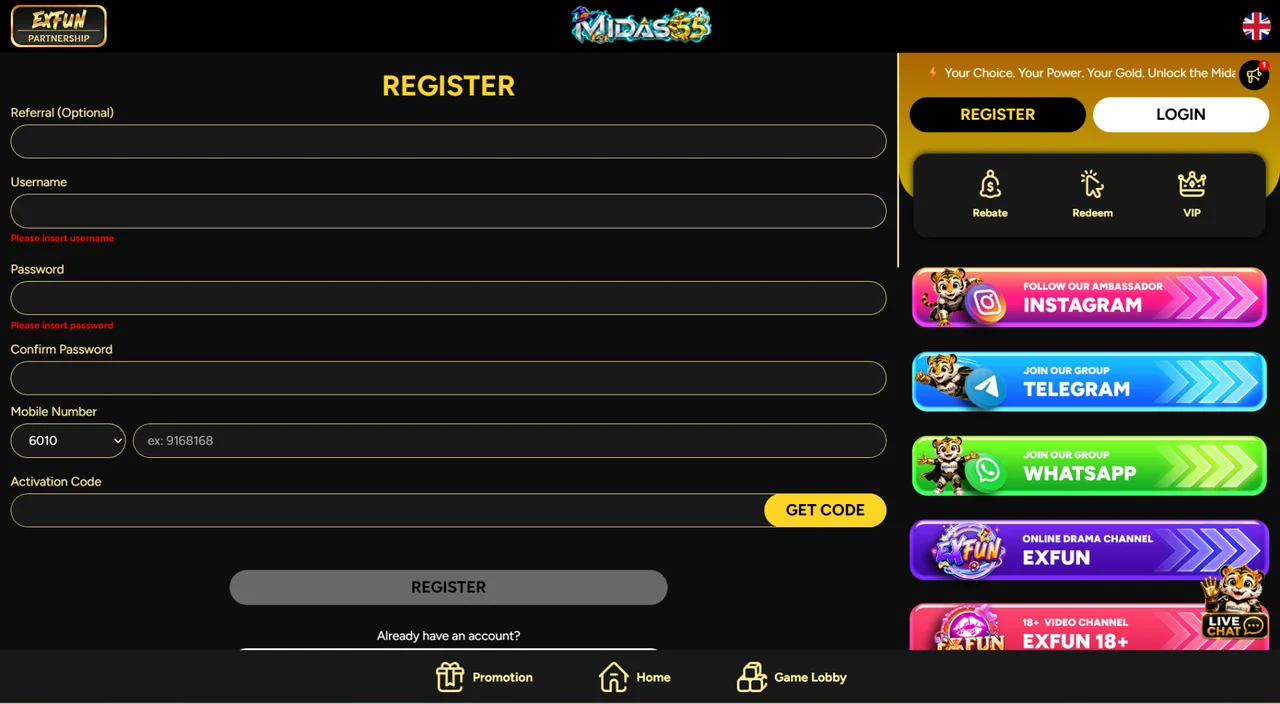
2. Choose Your Account Details
Enter your username and password, then repeat the password in the confirmation field. If a requirement or validation message appears, resolve it before continuing.
3. Check Your Mobile Number
Select the appropriate country code and enter the mobile number carefully. Use a number you control and expect to keep, because it is relevant to verification and account recovery.
4. Request and Enter the Activation Code
Use Get Code and enter the verification message in the activation-code field. If you need another message, wait until the resend option is available and follow the screen instructions.
5. Review and Submit
Check the information, review any terms presented by the form and select Register. Follow the website's response to finish account setup.
Do You Need a Midas55 Referral Code?
The registration form labels the referral field as optional. Enter a code if one was specifically provided for your registration; otherwise, you can leave the optional field blank.
Do not assume that a referral code automatically qualifies your account for a particular bonus. Check the conditions of the offer you intend to claim.
Choose Your Next Step After Registration
Review a Welcome Offer
Open the main promotions page before making a deposit for an offer. Follow that promotion's stated deposit and claim sequence. Our bonus guide explains the conditions to compare.
Set Up Your Payment Route
Read the deposit and withdrawal guide to understand available MYR payment methods, name matching and what to record for a transaction.
Get Android Access
If you prefer an installed app, visit the Midas55 APK page. You can also continue using the main website in your browser.
Registration Not Going Through?
The Activation Code Is Missing
Check the phone number, signal and blocked messages. Use the website's resend option when it becomes available. If no message arrives, contact support with the step and error you are seeing.
The Username or Mobile Number Is Rejected
Read the field-specific message. If you may already have an account, use login and recovery help rather than creating another one.
The Form Stops After You Submit
Check whether a confirmation or error has appeared before submitting again. Record the message and ask Midas55 support to help if the result is unclear.
Midas55 Registration FAQ
Is there a fee to create an account?
No. Account registration is free. A deposit is separate from creating the account.
Can I register from my phone?
Yes. Open the main registration page in your mobile browser and complete the form there.
Should I open another account if I cannot sign in?
Use account recovery or contact support first. Creating another account can cause additional account and promotion eligibility problems.